How can I easily save a location when in the field?
When you’re out in the field and want to mark a spot for your Peek excursion, you can do this in two ways. The easiest and most seamless…



 Peek
Peek
When you’re out in the field and want to mark a spot for your Peek excursion, you can do this in two ways. The easiest and most seamless…
Yes, to avoid a slow app and to ensure that all data can be processed properly. Our experience is that actually all excursions stay within this margin. However,…
Peek can show video and audio files from YouTube and Spotify in the app, as well as audio files that you have uploaded in My Peek. The url…
Under ‘Locations’, you can start adding locations by either clicking on the map, or by using the search bar using an address or lat/long coordinates. Use the drop-down…
Yes, you can send a student or a group in the field at certain fixed times. In this way you can also give a student the freedom to…
Yes, you can! A very nice feature to include storytelling in your trip, e.g. by staff members, you, or stakeholders from the area! So while creating a field…
Yes, you can by adding a hyperlink to your text. Select a part of your text which is referring to the URL. After that click the hyperlink symbol…
When you have finished a question, you can press the ‘Add location’ button at the bottom of your screen.
To add a picture to your question, you can simply use the “Add Media” button, or paste a link to a picture that you uploaded e.g. on Dropbox…
Here you will write the text the participant will see after answering the question. The way you fill it in, depends on the type of question. This is…
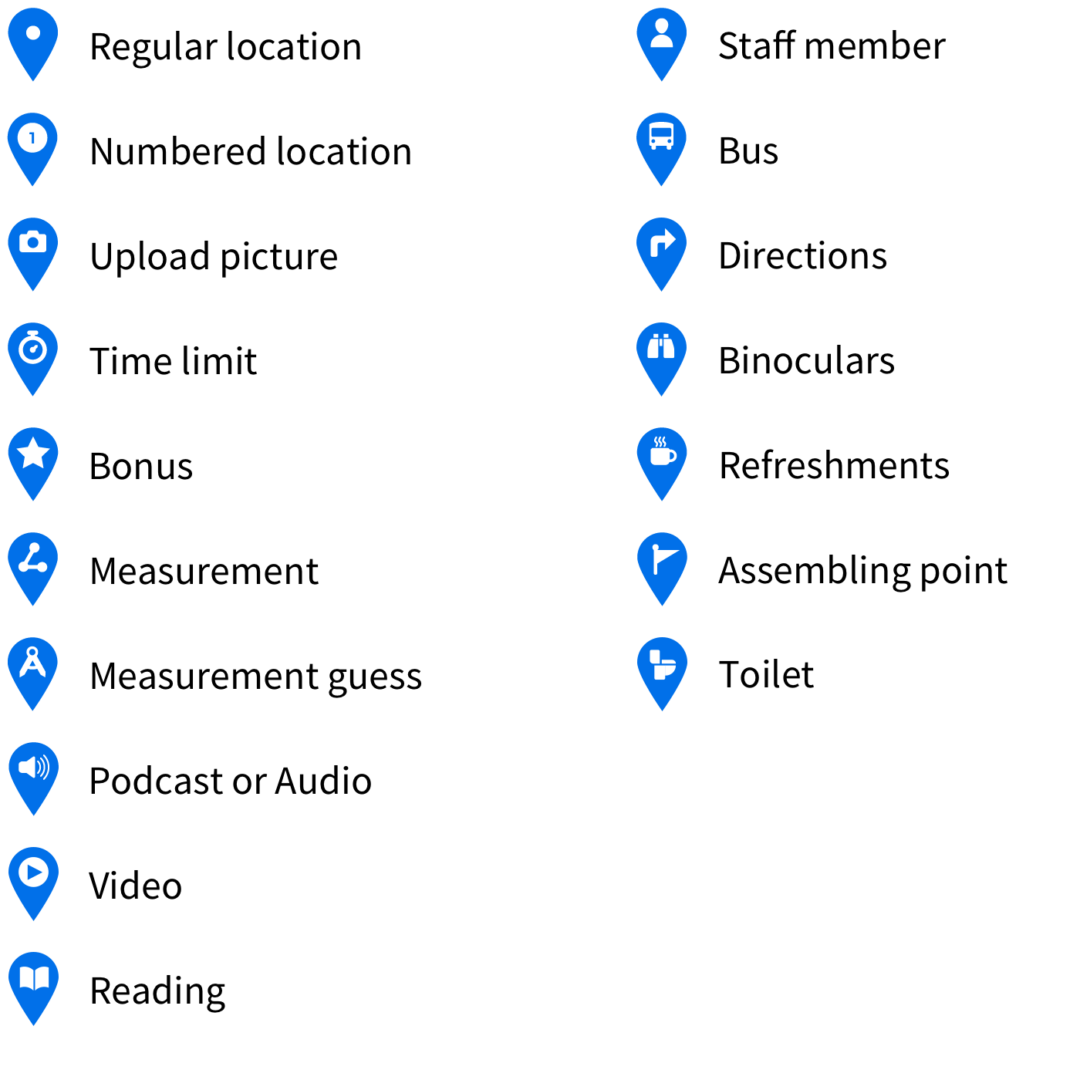
Yes! There is a variety of different icons for locations to choose from available in the editor. See the image below for the different icon types.
Select this type of question when you want participants to upload a picture of something, for example a certain tree. If you want the participants to upload multiple…
Select this type of question when you just want to give information at a certain location, for example when you want participants to go to a lecturer or…
Select this type of question when you want participants to make an estimate of something. You can add the minimum/maximum range of correct answers in the ‘answer’ section. You…
Select this type of question when you want to ask participants a question where they can select from the answer possibilities. You can add the possible answers yourself…
Select this type of question when you ask participants a question that requires an open answer. They can write anything in the ‘Answer’ box. In this case, only…
In general, you can ask open questions, multiple choice and estimation questions (with a certain given range of correct and wrong answers). But you can also share links…
Yes! Instead of pressing the ‘Add location’ button when you are finished with the first question, you need to press ‘Add question’ in order to be able to…
Before creating a field trip, log in. If logged in, head to My Peek. After that click: ‘Create a new field trip’. Choose your course in the drop-down…